Autonomous Computer Agent: Computer Vision, LLM, and Real Interface Control

Summary
An autonomous agent plays Microsoft Solitaire Collection through the real screen and mouse: computer vision recognizes the state of the interface, a deterministic Rule Engine computes legal actions, a local LLM selects a strategic move, and WinAPI executes it physically. The agent does not use the game's API, does not read process memory, and has no access to the application's internal state — for it, the game exists only as screen and input.
The architecture deliberately separates concerns: the rules determine which actions are legal, while the LLM decides which of them to choose, so an illegal move is excluded by construction. The project combined five disciplines: computer vision, training a custom model, deterministic game logic, LLM planning, and robotic interface control. The result is 99.91% card classification accuracy, 8 ms per card recognition, and 40 consecutive moves without desynchronization between memory and screen in one of the live runs.
Technology Stack
| Technology | Role |
|---|---|
| Python 3.12 | the entire project |
| PyTorch + torchvision | training and inference of MobileNet v2 |
| MobileNet v2 (ImageNet) | fine-tuning on 52 card classes |
| Ollama + qwen2.5:14b | LLM planner locally, without internet |
| DeepSeek API (OpenAI-compatible) | alternative planner backend |
| qwen2.5vl:7b | automatic dataset labeling and rejection of "stacks" |
| OpenCV / Pillow / NumPy | pixel analysis, segmentation, geometry |
| mss (capture via DWM) | screenshots of the UWP window |
WinAPI SendInput (ctypes) |
clicks, drag, Ctrl+Z — the only input accepted by UWP |
| pywin32 | window lookup, client area, focus |
http.server (stdlib) |
local autoplay server |
| HTML/CSS/JS | web UI with buttons and a log |
| Tesseract OCR | the first (discarded) approach to reading the rank |
Why Klondike is a fair testbed, not a toy
The temptation to build a "solitaire bot" runs into the fact that the game has no API. All the agent has is pixels and a mouse. These are exactly the conditions any computer-use system finds itself in: RPA, an agent on someone else's application, UI automation without integration.
Additional difficulty comes from the fact that Microsoft Solitaire Collection is a
UWP application, not an ordinary .exe:
| UWP problem | What happens |
|---|---|
| The window is not visible through the ordinary Win32 API | Window enumeration returns empty, MainWindowHandle = 0 |
BitBlt (GDI) does not capture the content |
The screenshot comes out black: average brightness 36, green felt 0% |
| Synthetic input is ignored | mouse_event, SetCursorPos, instrumental drag — the application does not accept them |
The window lives in ApplicationFrameHost |
The title, geometry and client area are computed differently than for a Win32 window |
Plus the domain complexity of the game itself: cards overlap each other in a fan, for face-down cards neither rank nor suit is known, and the table state has to be kept in memory between actions — because overlapped cards cannot be read from the screen.
Architecture: Vision → Rules → Planning → Action → Verification
This is the core of the project. Five components, one loop, and one contract.
flowchart TD
    A["Game screen<br>UWP window 1920×1040"] -->|"screenshot (mss)"| B["Vision<br>geometry + MobileNet v2"]
    B -->|"Board<br>(table state)"| C["Rule Engine<br>get_valid_moves / apply_move"]
    C -->|"numbered list<br>of valid moves"| D["LLM Planner<br>Ollama qwen2.5:14b"]
    D -->|"move_index + reasoning"| E["Act<br>SendInput: click / drag"]
    E -->|"physical action"| A
    A -->|"new frame"| F["Verification<br>memory vs screen check"]
    F -->|"match: continue"| C
F -.->|"mismatch: Undo + retry"| E| Component | Task | Code |
|---|---|---|
| Vision | find the table, columns, and cards; read what is actually visible | vision/ |
| Rule Engine | pure logic: which actions are valid and what follows each | orchestrator/rule_engine.py |
| LLM Planner | choose one action from the list and explain the choice | planner/ |
| Act | turn the action into pixels and execute it physically | act/ |
| Verification | confirm that the screen became what memory predicted | orchestrator/verify.py, quantity_guard.py, loop_guard.py |
Infrastructure (not an architectural layer, but the scaffolding): a local server
server.py with "move / autoplay / stop" buttons and the web/index.html UI,
logging of moves and errors.
sol-dev/
├── vision/                   # computer vision
│   ├── calibration.py        #   table geometry
│   ├── card_extraction.py    #   card / corner crop
│   ├── recognizer.py         #   MobileNet v2: crop → (rank, suit)
│   ├── screen_to_board.py    #   frame → Board (the main "bridge")
│   └── dataset_collector.py  #   dataset collection from live play
├── orchestrator/
│   ├── rule_engine.py        # rules: move generation and application
│   ├── verify.py             # memory vs screen check
│   ├── quantity_guard.py     # "how many cards actually moved"
│   └── loop_guard.py         # structural anti-loop
├── planner/
│   ├── prompts.py            # prompt contract (move from the list)
│   └── llm_planner.py        # Ollama / OpenAI-compatible API / Mock
├── act/
│   ├── controller.py         # SendInput: clicks, drag, Ctrl+Z
│   └── layout.py             # logical action → pixels
├── scripts/                  # training, dataset collection and labeling, diagnostics
├── tests/                    # tests, including on real game frames
├── web/index.html            # UI: make a move / autoplay / stop
├── server.py                 # local autoplay server
└── model.pth                 # trained model (9.4 MB)
Main Architectural Principle
The LLM is not given the right to invent actions on its own.
| Component | Responsibility |
|---|---|
| Rule Engine | generates the list of allowed moves |
| LLM Planner | selects one move from the list |
| Act | executes the selected move physically |
| Verification | verifies the result |
The language model is used where it is genuinely needed — for choosing a strategy — while the critical invariants of the system remain deterministic: move legality, application of a move to the state, screen geometry, and result verification.
Practical effect: an entire class of LLM failures ("invented move", "illegal
move", "move to nowhere") is excluded by construction, rather than by post-hoc
checks. The model's response is parsed strictly ({"move_index": N}) and validated against the bounds
of the list.
Where the AI Is Here
This question will inevitably come up, so it is answered right away and explicitly.
| Component | Type | Role |
|---|---|---|
| MobileNet v2 (custom, fine-tuned) | trained neural network | classification of 52 card types by crop |
| qwen2.5vl:7b | vision-language model | auxiliary automatic dataset labeling and rejection of "glued" cards |
| qwen2.5:14b (Ollama) / DeepSeek | LLM | strategic selection among valid actions |
At the same time, screen geometry, game rules, move generation, validation, mouse control, and result verification remain deterministic. This is done deliberately: different types of tasks are solved by different tools — probabilistic models where robustness to pixel variability and semantic choice are needed; plain code where guarantees are needed.
Layer 1. Vision
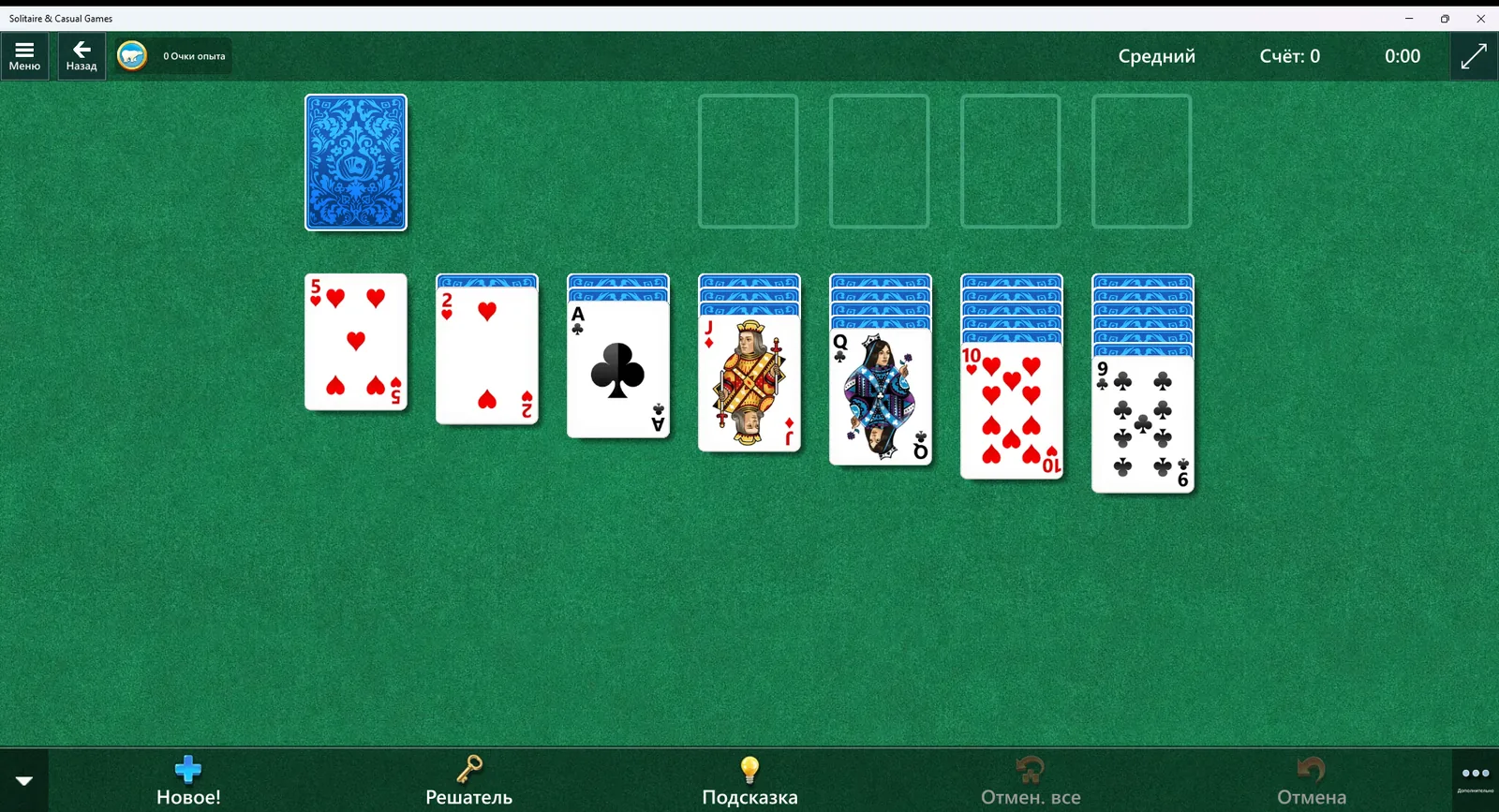
A fresh deal: 7 columns, each with N−1 face-down cards and one face-up, a full stock, empty waste and foundations. This frame is one of the project's test reference images.
Evolution of the approach: what was tried and why it was abandoned
Vision in the project went through four generations. The failed branches are deliberately not cut out: they are exactly what explains why the final architecture looks the way it does and not otherwise.
| Generation | Approach | Why it didn't fit |
|---|---|---|
| 1 | Color segmentation of the felt and card backs, search for white rectangles | Works for geometry, but gives no answer as to which card it is |
| 2 | Tesseract OCR for rank (voting over 36 attempts) + symbol shape for suit (crown for the king, "tail" for the queen) | The stylized font and the 41×54 px icon are distinguished inconsistently; suit accuracy is insufficient for play |
| 3 | Vision-LLM (moondream, then qwen2.5vl:7b) as an on-the-fly recognizer |
On tiny corners it answered with garbage; even when it answered correctly — tens of seconds per move |
| 4 | A custom MobileNet v2 over 52 classes, trained on crops from this same game | The final option: 8 ms per card, 99.91% accuracy |
The conclusion from the third generation was a turning point:
A narrow card-classification task should not be "asked" of a large model, but a small custom one should be trained.
The same happened with input: mouse_event and SetCursorPos did not work, the
instrumental drag from the MCP module did not work — only the combination of
mss (capture via DWM) + WinAPI SendInput turned out to work.
Geometry instead of hardcoding
Coordinates cannot be hardcoded as constants: the window moves, changes size, the game runs both in a window and fullscreen, and on a second monitor. Therefore the table is described by measurable quantities:
| Quantity | Value (live table 1920×1040) | How it is measured |
|---|---|---|
| Centers of the 7 columns | 455, 623, 791, 959, 1127, 1295, 1463 | clusters of "non-felt" along a row |
| Column grid step | 168 px | minimum gap between detected columns |
| Card size | 131 × 176 px | ≈0.78 and ≈1.05 of the grid step |
| Table top (scoreboard) | y = 350 | median of the tops of non-empty columns |
| Top row (stock/waste/foundations) | y = 120 | start of the strip |
| Fan step of face-up cards | 55 px (0.3125·card_h) | calibrated from confirmed moves |
| Step of face-down cards (backs) | ≈18 px (0.102·card_h) | measured by blue |
| Waste fan step (draw-3) | ≈13.5 px (0.103·card_w) | by the width of the white cluster |
Two principles born out of pain:
- Everything is measured from pixels, not from screen fractions. The estimate "table top = 33% of height" gave 343 px against the actual 350 — and a drop into an empty column went 7 px above the slot, and the move was not accepted.
- Only what is fully visible is read. Overlapped fan cards fundamentally cannot be recognized: the crop of such a card is the top 55 px of one card plus the face of the next. This is exactly where the project lost the most time.
Dataset: 3254 cards collected from a live game
The data was collected not from the internet, but from this very game: the model must see the same render, the same font, the same antialiasing as in battle.
flowchart LR
A["Collector script<br>frame every 3 sec"] --> B["dataset_full/_unlabeled<br>cutout of the full card 131×176"]
B --> C["sort_full.py<br>qwen2.5vl:7b: \"card or stack?\""]
C -->|single card| D["Another question to the model:<br>rank + suit"]
C -->|stack of 2–3 cards| E["_trash<br>(not used in training)"]
D --> F["dataset_full/<rank>_<suit><br>52 classes"]
F --> G["manual review by eye"]Three details of this stage:
- Auto-labeling by a neural network. A local
qwen2.5vl:7bvia Ollama labeled the images into class folders (8_diamonds,Q_hearts, …). The script was deliberately not considered perfect: it itself warns that the model confuses the suit, so after the run the folders were reviewed by eye. - Rejection of "stacks". Glued cards (the top one + the face of the next) were
cleaned up by a separate script:
sort_full.pyasked the vision model "is this one card or a stack?" and sent stacks to_trash. Later it turned out how important this was: it was precisely on "stacks" that the model broke in prod. - Combating class imbalance. The first version of the dataset was skewed: kings accumulated 200+, while rare cards had 7–13 each. Rare classes were collected purposefully. The final result — 52 classes, 3254 images, a minimum of 13 images per class.
In parallel, a second dataset existed — card corners (41×54, ~3967 items). It was useful for the first generation of the model, but was inferior to the full crop: a corner loses the context of the card. The final choice — training on full cards 131×176.
MobileNet v2: training
The project's learning goal required not "calling an API" but building a custom model. The choice fell on mobilenet_v2 from torchvision — small, fast, and sufficient for the "52 classes" task.
model = torchvision.models.mobilenet_v2(weights="IMAGENET1K_V1")
model.classifier[1] = nn.Linear(model.classifier[1].in_features, 52)
criterion = nn.CrossEntropyLoss()
optimizer = torch.optim.Adam(model.parameters(), lr=0.001)
| Parameter | Value |
|---|---|
| Architecture | MobileNet v2, ImageNet pretraining (IMAGENET1K_V1) |
| Head | classifier[1] → Linear(…, 52 classes) |
| Input | 224×224 (Resize), ImageNet normalization |
| Classes | 52 (rank × suit) |
| Dataset | 3254 images, 80/20 split |
| Batch / epochs / learning rate | 32 / 10 / 0.001 |
| Optimizer / loss function | Adam / CrossEntropyLoss |
| Parameters | 2,290,484 |
| Model weight | model.pth, 9.4 MB |
| Latency | 6.7 ms pure inference, 8.1 ms with crop and preprocessing |
About accuracy — three different numbers, and this is not a contradiction. They are easy to confuse, so they are explicitly separated:
| What is measured | Dataset | Result |
|---|---|---|
| Training protocol in the project (last epoch) | 3254 | 99.5% on the held-out 20% |
Control measurement of the final model.pth, held-out 650 images |
3254 | 100% (650/650) |
Control measurement of the final model.pth, entire dataset |
3254 | 99.91% (3251/3254) |
Why this is so: the 99.5% figure comes from the protocol of that training run; 99.91% and 100% are repeated measurements of the very model file that is in the project, made for this case. For a portfolio, the second is more important: 99.91% is accuracy on the entire dataset (3251 out of 3254 correct classifications), and 100% is the result on the held-out set of 650 images that the model did not see during training.
The three errors the model makes on the entire dataset: 6♦ → 9♦, 9♥ → A♠, A♥ → K♠. It is telling that all three are on images from the "dirty" early period of the dataset.
And the main practical takeaway of this section: the model is not to blame for errors if it is given the wrong image. In production, it showed confidence 0.25 and confused the suit — but only because it was fed a crop of an overlapped card. On a clean card, confidence is 1.000.
What the model actually sees in the game
| Object | How it is read |
|---|---|
| Playable card of a column | bottom of the stack minus card height (the bottom card is always fully visible) |
| Top card of the waste | the rightmost card of the fan, crop from its exact top |
| Card backs | counted structurally: a solid blue group at the top |
| Empty column | "no cards in frame" — a check that the bottom card is not a card back |
| Stock | presence/absence (blue card back vs. green "recharge" circle) |
Overlapped cards of the fan are never sent to the model. Their fate is decided by memory: the actions the agent performed are known exactly, and a revealed card is read from the screen exactly at the moment it becomes visible.
Layer 2. Rule Engine: rules separate from "intelligence"
orchestrator/rule_engine.py — a pure module without CV, without LLM, without pixels:
Board, Card, Move, get_valid_moves(), apply_move(). It can (and should)
be covered by tests — which has been done (tests/test_rule_engine.py, test_verify.py).
What is taken into account:
- Klondike draw-3. A single click on the stock opens up to three cards; the playable one is only the top card. The waste is a stack, not a window of three cards: the remainder of the triple does not disappear but ceases to be the top and resurfaces later.
- Limit on moving a run (
MAX_RUN_MOVE = 4): a long drag in UWP is physically unreliable — the gesture breaks, the run "does not reach". - Deterministic generation: moves of subsequences (up to 4 cards), moves to the foundation, moves to an empty column.
- Empty column is displayed as
(empty)— so that the planner understands that a king can be placed there.
It is this layer that provides the "list of valid moves" that the LLM receives.
Layer 3. LLM Planner: choose, not invent
The system prompt (planner/prompts.py) is a set of game rules expressed in words,
ordered by priority:
- any action on the foundation — unconditionally first;
- revealing a hidden card — the main priority after the foundation;
- a discard move — only if it does not interfere with revealing;
- never make an action that can be immediately undone without benefit;
- do not move a stack between equivalent targets (two black kings);
- do not "park" a bare king on an empty column;
- drawing from the stock — when there are no moves for revealing/foundation/discard.
The engine assists the model: in the move description it itself marks [REVEALS a hidden
card] and (EMPTY column), meaning the strategic hint comes from
deterministic logic rather than being reinvented by the language model.
The backend is abstracted: OllamaBackend (local qwen2.5:14b, free and without
internet), OpenAICompatibleBackend (DeepSeek and any OpenAI-compatible API), and
MockBackend for tests. Switching is one line in .env.
A practical nuance of local execution: qwen2.5:14b weighs ≈10 GB, and on an 8 GB
graphics card it partially offloads to CPU (≈36% CPU / 64% GPU) and still responds in
5–15 seconds per move. This is the price of "free and local".
Accelerated path for unambiguous actions
If among the allowed actions there is a move of an ace to an empty foundation, the server performs it without querying the LLM. This unambiguous action does not require probabilistic choice: an ace on an empty foundation is the only always-correct move, and there is no reason to leave it to the model's discretion.
Deterministic fallback instead of "the first move that comes up"
If the local model returns an index outside the allowed range, the response is considered incorrect, and a deterministic fallback is applied: the first element of the already filtered list of allowed moves is taken. This is safe by construction — the list is formed by the Rule Engine, so there is no illegal action in it; the fallback may choose an unsuccessful action, but cannot choose a forbidden one.
Below the LLM there is another layer of protection — deterministic anti-shuffle: the server discards from the list moves that reveal nothing and move a card to an equivalent target. A weak model simply will not see meaningless moves.
Layer 4. Act: the mouse that UWP accepts
The most "thankless" layer: the application ignores almost everything that is usually used for automation.
| Mechanism | Result on UWP |
|---|---|
GDI BitBlt for screenshots |
black frame |
mss (capture via DWM) |
correct frame |
mouse_event / SetCursorPos |
cursor moves, map does not |
SendInput (WinAPI) with absolute coordinates |
works |
Three things that had to be figured out separately:
- Absolute coordinates are calculated from the size of the primary monitor
(
GetSystemMetrics(0/1)), not from the virtual screen — otherwise on a multi-monitor configuration clicks drift. - The client area of the UWP window is offset relative to the window rectangle (an offset of 12 px was found) — screenshot coordinates are converted to screen coordinates via the saved offset.
- Focus is taken exactly before the action. If focus is taken at the start of the turn, during the LLM response time (5–15 s) it will be intercepted by another program, and the click will go "into nowhere".
Drag is implemented as an honest gesture: press → hold, so that the map "lifts" → 50 movement steps with pauses → release. The grab point is calculated from the playable map taking into account the fan step: to lift a stack of N cards, one must click on the top card of the dragged block.
For rollbacks, Ctrl+Z is used via the same SendInput (the method is configured in
.env: hotkey or click on the "Cancel" button).
Layer 5. Verification: the screen is not taken at its word
After each action, the server captures a new frame and compares it with the state predicted by memory: the free card of each column, the top of the stock, the foundations. If there is a discrepancy, the screen is rolled back via Undo and the action is repeated, while memory is not corrected "by eye".
This proved more important than recognition accuracy: the verification layer turns "sometimes breaks" into "breaks, notices, and fixes itself". It was this that made it possible to debug the project to a state where 40 moves in a row pass without a single desync.
Three protective mechanics are built around verification:
quantity_guard— checks that exactly as many cards actually moved as were planned (by the shift of the free card of the target column; the fan step is calibrated live);loop_guard— a structural anti-cycle: if the column layout after a move has already occurred in this game, the move is discarded before the LLM sees it;- new game detection — if there is a fresh deal on the screen, memory is reset.
Infrastructure: server and web UI
server.py — a local server built on the standard library (http.server, without
Flask/FastAPI). Buttons in the browser: "Make a move", "Auto play", "Stop",
"Stop the server".
Besides the loop, the server also hosts: the game memory (_board, updated via
apply_move), a stop flag with interruptible animation pauses (so that "Stop"
triggers instantly), a move log move_log.log (survives a browser connection
drop), and a traceback in server_error.log.
The reality of autoplay: one move takes 5–20 seconds, almost all of which is the local LLM's response. Vision takes a fraction of a second.
What a single move looks like
A real example from a live run. This is how the engine sees the table state — this same text goes into the prompt:
Stock(24)   Waste: 9♥   Foundations: ♥:A♥ ♦:A♦ ♣:- ♠:-
------------------------------------------------------------
[1] 6♥
[2] ? 8♠
[3] ? 4♠
[4] ? ? ? 10♣
[5] ? ? ? Q♦
[6] ? ? 3♦
[7] ? ? ? ? ? ? 10♠
? — a face-down card: its rank and suit are unknown and not needed until it is
revealed. But here is what the LLM planner receives:
Available moves:
0. Draw a card from the stock (stock -> waste) (top of waste: 9♥)
1. Move top waste card 9♥ to column 4 [onto 10♣]
2. Move top waste card 9♥ to column 7 [onto 10♠]
3. Column 6: move 3♦ (1 card(s)) to column 3 [onto 4♠]  [REVEALS a hidden card]

Choose a move and explain your decision.
The model's response (real format):
Move 3 reveals a face-down card in column 6, which is the top priority.
{"move_index": 3}
After that, the server does everything: translates the action into pixels → takes window focus →
performs the drag → captures a new frame → compares it with the predicted state →
reads the revealed card → writes the move and the rationale to move_log.log and to the
web UI.
Chronicle: how the project came together phase by phase
| Phase | What was done | How it ended |
|---|---|---|
| 0. MCP prototype | Testing the MCP computer-control module on a UWP game | Separate case: the module hits a wall with UWP, vision is built by hand |
| 1. Window and input | Finding the window in ApplicationFrameHost, screenshots, clicks, drag |
mss + SendInput — the only working combination |
| 2. Vision by hand | Color segmentation, OCR with voting, symbol shape | Works, but suit accuracy is insufficient for the game |
| 3. Calibration | Table geometry, self-calibration on every frame | 7 columns even when empty; grid step derived from pixels |
| 4. Custom model | Dataset collection from live play, auto-labeling, MobileNet v2 | 99.5% on the holdout set |
| 5. "Screen → Board" bridge | Wiring CV and rules together, the first live move | The agent makes its first real move with the mouse |
| 6. Rules and LLM | rule_engine, prompt contract, local qwen2.5 |
The LLM picks a move from the list, does not invent one |
| 7. Verification | Reconciling memory with the screen, Undo and action replay | A failed move no longer "corrupts" memory |
| 8. Anti-loops | loop_guard, quantity_guard, anti-shuffle |
The agent stopped endlessly moving the same thing back and forth |
| 9. Autoplay and UI | Web buttons, auto-loop, logs, stop | The game plays itself |
| 10. "Stuck" analysis | Finding the causes of loops from the live log and pixels | Five root causes found, autoplay is stable |
After consulting an external expert, the key architectural frame emerged:
game memory is the source of truth, the screen is read only where the card
is fully visible, and a discrepancy is treated by rolling the screen back, not by
editing memory. This frame determined the design of verify.py, _merge_resync,
and the "Undo + replay" loop.
Key Engineering Challenges
Six tasks that shaped the project. Each one came from real debugging.
| Problem | Essence | Solution |
|---|---|---|
| UWP does not accept synthetic input | mouse_event, SetCursorPos, instrumented drag are ignored; BitBlt produces a black frame |
capture via mss (DWM), input via WinAPI SendInput with absolute coordinates from the primary monitor |
| Incorrect table geometry | coordinates cannot be hardcoded: the window moves, resizes, works on two monitors | everything is measured from frame pixels: column grid, card size, table top, row anchors |
| Overlapping cards | fan: only a strip of each card is visible, the "middle" cannot be recognized | only a fully visible card is read; the fan composition is maintained in memory |
| Empty columns | the algorithm determined the grid by the average gap size, and an empty column gives a multiple gap → the grid shifted | grid step = minimum gap + verification by card width |
| Memory and screen desynchronization | the agent "thinks" one thing, the screen shows another: clicks go to the wrong place, memory accumulates phantoms | Verification layer: after each action, the frame is compared with the prediction; on mismatch — Undo and retry |
| Infinite loops | the agent moves the same thing back and forth or endlessly draws cards | structural loop_guard (layout signature), anti-shuffle filter, counter of "dead" deck passes |
The remaining bugs — geometry of the talon and foundations, truncated long stacks, incorrect stack capture point, "zombie servers" on the port — are collected below, in the incident analysis.
Incident analysis: five causes of "Stuck"
The most telling part of the project. The symptom looked like this:
Last action
⛔ Stuck
— and this after several successful moves. The log showed a desync:
chosen = Move 1 card(s) from column 3 to column 4
attempt 0: ok=False reason = col 4 top: mem=10♣ screen=K♠
identity mismatch — point-fixed from screen, re-plan
chosen = Move 1 card(s) from column 5 to column 4   ← and the same thing again
Memory believed the top of column 4 was the ten of clubs, while the "screen" showed a king. Moreover, memory was right: the actual playable card in that column is 10♣. The vision layer was wrong. Pixel analysis yielded five independent root causes.
Cause 1 (main): when a "model error" turned out to be a pipeline error
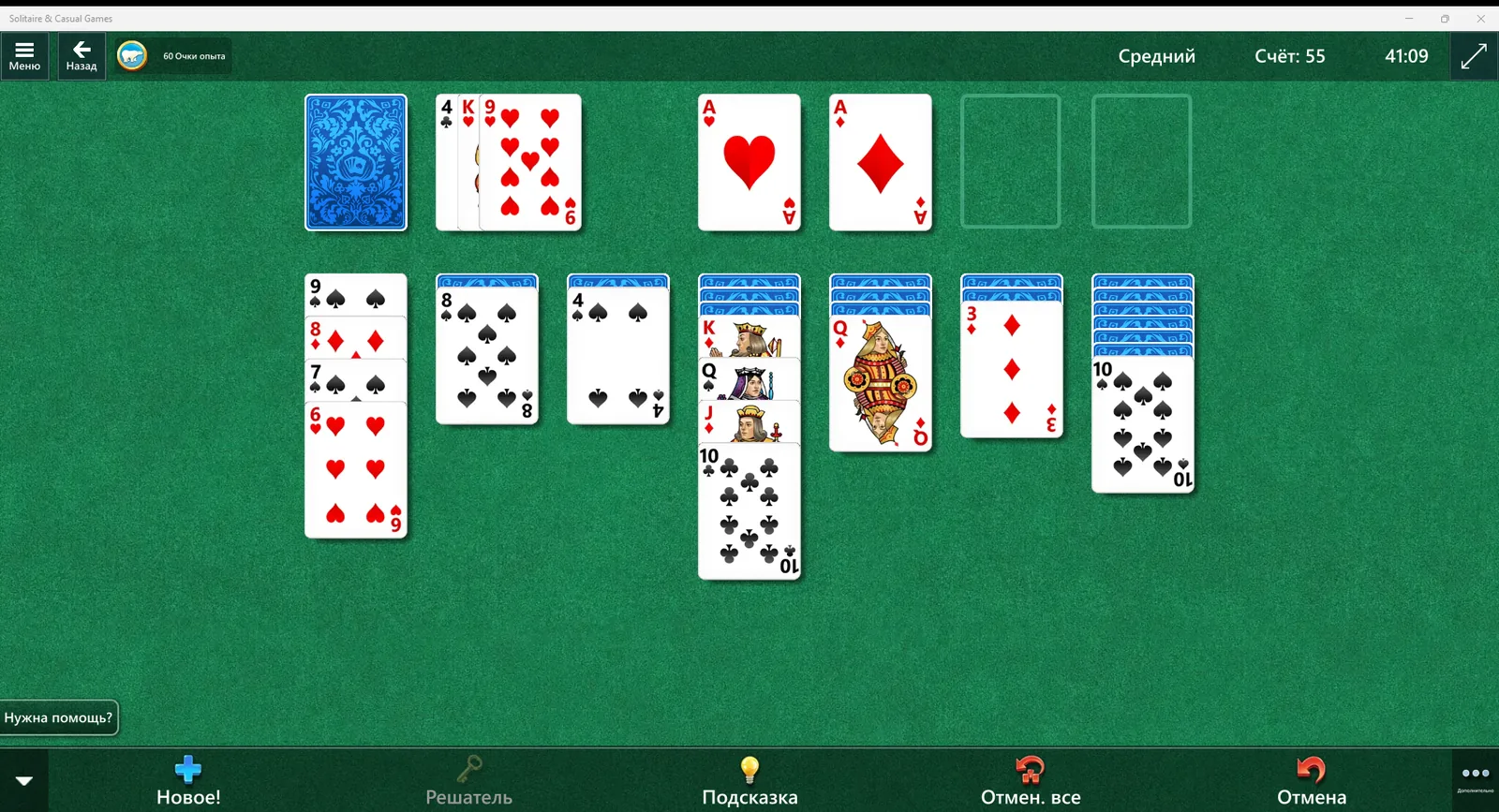
Midgame. In column 4 there is a fan K♦ Q♠ J♦ 10♣: only the top strip of each
card is visible. The playable one here is the bottom one (10♣), and that is exactly the one that must be read.
The card-counting function returned open_y — the top of the first face-up card in the column
(the one immediately under the face-down cards). But all the rest of the code — clicks, verification,
action generation, re-reading cards — treats open_y as the top of the bottom,
playable card.
| Column 4 (actual) | What vision read | What memory knew |
|---|---|---|
? ? ? K♦ Q♠ J♦ 10♣ |
K♦, confidence 0.25, suit wrong |
10♣ — correct |
The model received as input a splice: the top 55 px of the king plus the face of the next card. Hence the suit confusion, the low confidence, and the false "desyncs". It looked like "the neural network confuses cards", but in reality it was a pipeline error: an incorrect crop.
Fix: the playable card is found by pure geometry, without counting the fan — the bottom card of a column is always fully visible, so its top = the bottom of the stack minus the card height. After the fix, all seven columns are read with confidence 1.000.
This same error also broke clicks: the stack grab point was computed from the incorrect
open_y, meaning the drag started (N−1)·55 px above the intended position.
A separate lesson: the invariant "open_y is the top of the bottom, playable card" was
written directly in the code comments — both in the clicks module and in the
verification module. But the implementation did not fulfill it: comments are not checked
by the compiler. That is precisely why regression tests on real frames became the project's
final deliverable.
Cause 2: an empty column broke the entire geometry
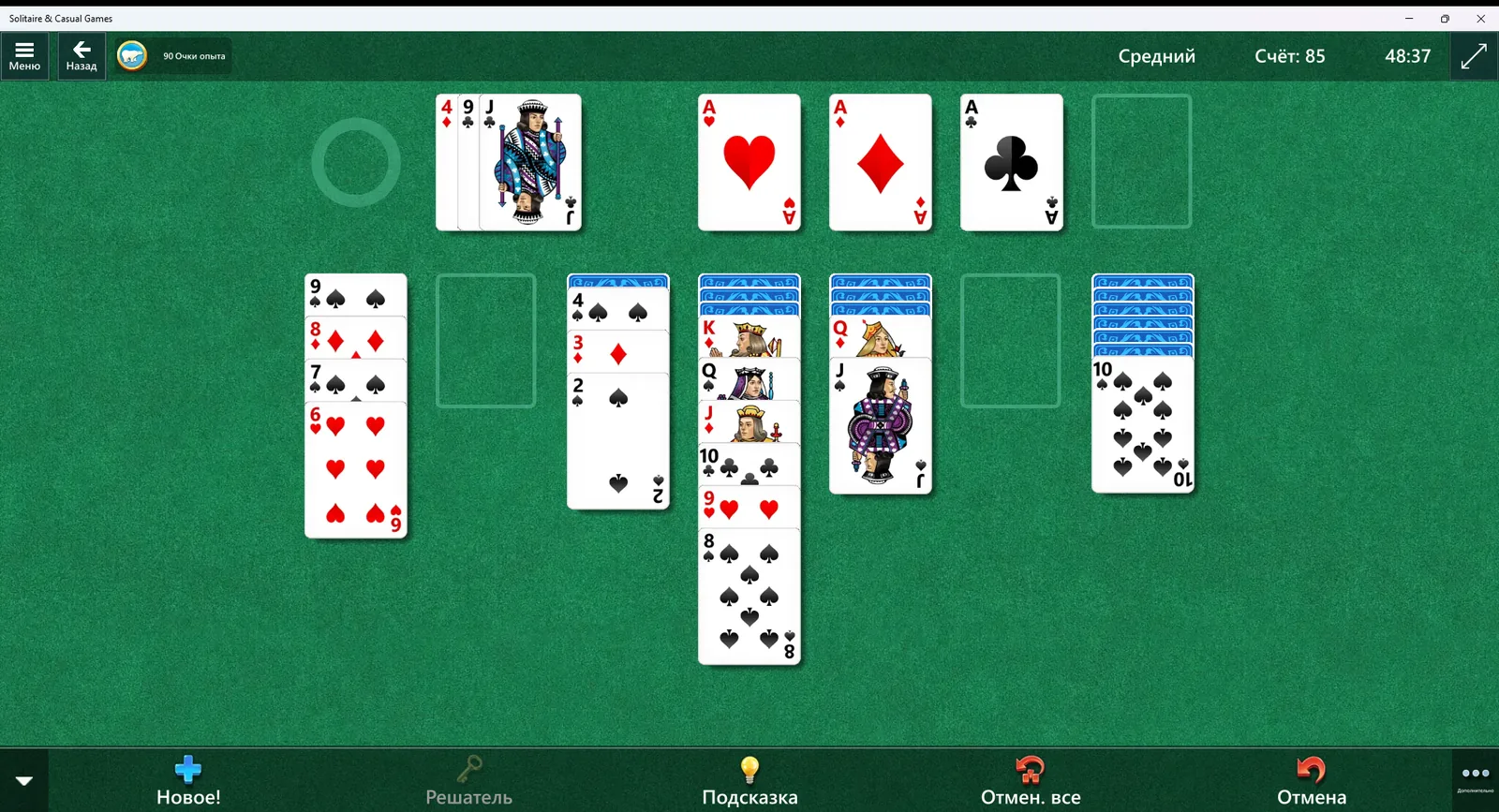
That very frame: columns 2 and 6 are empty (no playable cards), and it is because of them that the grid step was computed as one and a half steps, and all table reading turned into garbage.
The grid step was computed as the median of the gaps between detected columns. An empty
column does not disappear from the grid — it simply produces no cluster, so the gaps
become multiples of the step: [1, 2, 2, 1] steps, and the median of such a set is one and a half
steps.
| Frame with empty columns 2 and 6 | Detected centers | "Card size" |
|---|---|---|
| Before fix | 203, 455, 707, 959, 1211, 1463, 1715 | 197×265 |
| After fix | 455, 623, 791, 959, 1127, 1295, 1463 | 131×176 |
A single empty column was enough — and all table reading turned into garbage.
Fix: step = the minimum gap (empty columns only produce multiple gaps) plus an independent check against the card width; the grid is chosen by the number of matched columns, not just by centering.
Cause 3: the table top was guessed and missed by 7 px
int(H × 0.33) = 343 px, while the table cards actually start at 350. Because of this,
the drop into an empty column landed above the empty slot, and the count check
rejected the correct move.
Fix: the table top is measured (the median of the tops of non-empty columns — in Klondike all columns start at the same height), and the target for a king in an empty column is the center of the slot.
Cause 4: waste and stock after a restart mid-game
Overlapped cards cannot be read — meaning that after a server restart, memory knows only the visible waste fan (≤3 cards). Then a chain began:
- the top waste card was re-read only if a placeholder was present in memory —
a known but incorrect card remained forever (
waste: mem=J♣ screen=5♦); - the "point fix" for the waste turned out to be a stub: it returned "fixed" without writing anything — the planner again chose the same draw, and the cycle spun;
- after the deck was recycled, memory carried "known" cards in the stock that were merely a guess — and the draw "predicted" the wrong card from the one actually revealed.
Fixes: the top waste card is always re-read from the screen (it is fully visible → the screen is authoritative); the point fix actually writes the value; the presence of the deck is verified against the screen before choosing an action (blue back versus the green recycle circle), and the deck contents are held as placeholders.
Cause 5: the blue portrait of a face card was mistaken for a card back
The check "is this card a card back?" was performed on the central strip of the card. For face cards (Q♣, J♦, K♥) the portrait is drawn in blue and purple — Q♣ produced more than half blue in the center, and the column was read as "fully closed".
| Object | Blue fraction over the whole card |
|---|---|
| Card back (stock) | 1.000 |
| Q♣ (blue dress) | 0.214 |
| 5♥, 2♥, A♣, J♦, 10♥, 9♣ | 0.000 |
Fix: the feature is computed over the entire card area with an inset from the edge, threshold 0.5.
Other bugs found in the same analysis
They are not given separate sections, but they cost time — and they illustrate well the class of errors "wrong constant / wrong formula":
- stock coordinate was computed as the average of all blue pixels → (564, 207) instead of the actual (455, 207), the click did not flip the card;
- foundation slots were computed as
centers[0] + step·(2+i)→ they landed on columns 2–5, and a double click removed an ace from the table back; - long stacks were truncated by the scan boundary
0.65·H— the middle card was considered "playable", hence ghost cards and duplicates (4♠ 4♠); - the top of the card was detected incorrectly (the crop started 160 px below the actual edge) — K♦ was read as 3♥ with confidence 0.29; a search window of ±25 px gave confidence 1.000;
- in the search for a valid sequence the rank operands were swapped → the length of the movable block always came out as 1 ("the model takes 4♣ from the middle");
- the "Stop" button did not stop the game: the server is synchronous, the current move was played to completion (fixed by a stop flag and interruptible pauses);
- "code edits were not applied": up to five zombie servers with old code in memory were hanging on the port (fixed by the "Stop server" button).
Analysis summary
| Symptom | Cause | Evidence |
|---|---|---|
mem=10♣ screen=K♠ |
the first open card of the fan was read | confidence 0.25 → 1.000 after the fix |
| Garbage column centers | median of gaps with an empty column | 203…1715 → 455…1463 |
| Drop into an empty column did not work | table top 343 instead of 350 | the move was rejected by the count check |
waste: mem=J♣ screen=5♦ |
a stub in the point fix + guesses in the stock | 8 out of 10 moves failed → 20 out of 20 passed |
| Column "all closed" | blue portrait of Q♣ = "card back" | 0.214 versus 1.000 |
Key observation: all five causes are pipeline errors, not a "stupid LLM". The temptation to fix the looping by tweaking the prompt or switching the model would have been treating the symptom.
How this was tested
Regression tests on real frames. Three real game screenshots are stored as fixtures, and the reference for them was captured by eye — down to the rank and suit of each visible card. The test verifies that geometry and recognition return exactly this layout: a fresh deal, midgame with fans, a frame with empty columns.
python tests/test_screen_to_board_real_frame.py     → 8/8
python tests/test_verify.py                         → 9/9
python tests/test_rule_engine.py                    → ok
Live probe. A separate script makes N moves through the server API and after each move independently captures a frame, reads the table with its own vision, and compares it with the server's memory: the top of each column, the top of the discard, the foundations. Any discrepancy is printed as an error.
| Run | Moves | Memory↔screen discrepancies |
|---|---|---|
| Midgame | 20 | 0 |
| Fresh deal (Start → Auto play) | 40 | 0 |
| Game continuation | 21 | 0 |
| New game (control) | 12 | 0 |
The run on a fresh deal includes everything that used to break: aces to the foundation, moving stacks of 2–4 cards, moves to empty columns, moves from the discard, drawing and reloading the deck. The score in the game grew 0 → 200 → 260, three foundations were started.
Honesty instead of an "endless game". A separate mechanic (loop_guard) declares
the game unsolvable if the deck has gone through two full cycles without a single move to
the foundation. In draw-3, the order of cards after reloading repeats, so two empty
passes really do mean a dead layout. An honest "this layout is unsolvable,
start a new one" is better than endless reshuffling.
Results in numbers
| Metric | Value |
|---|---|
| Card classification accuracy | 99.91% (3251/3254) on the full dataset, 100% (650/650) on the holdout set |
| Parameters in the model / size | 2,290,484 / 9.4 MB |
| Recognition latency | 6.7 ms pure inference, 8.1 ms with crop and preprocessing |
| Full table read (frame → Board) | ≈150 ms (geometry + recognition); frame capture per project profiling ≈37 ms |
| Moves without desync | 40 in a row in a single run, 93 moves in total |
| Score in a game under AI control | 260 (three foundations started) |
| Dataset | 3254 full cards + 3967 corners, 52 classes |
| Tests | 8 + 9 + a set of rule tests, all green |
| Full move time | 5–20 s (almost all of it — the local LLM) |
All speed measurements were made on a real 1920×1040 frame using the same code that runs in the game: column geometry — 33 ms, row-anchor layout — 80 ms, full board read with all recognitions — 150 ms (of which ≈97 ms — twelve model inferences). Frame capture is not involved in these measurements: per the project profiling, it adds ≈37 ms.
Limitations and what was left out of scope
An honest section: the project is a learning exercise, and some things were deliberately left unfinished.
- Covered cards are not read by vision — this is not a bug, but the physics of the task. The composition of the fan is reconstructed from memory, not from pixels. Therefore, starting the server in the middle of a game yields "partial" memory: it self-recovers as moves are made, but never becomes perfect.
- Advertising in the game. A new game is started by the game's own menu, and an ad may play before the deal — automating this step (clicking through someone else's ad screen) was not done: that is already beyond the scope of the task.
- Speed is bottlenecked by the LLM. Vision takes fractions of a second, while a move takes 5–20 s due to the local 14B model. For more speed, a smaller model or a GPU with more memory is needed.
- Mid-level strategy. Prompt rules and anti-shuffle filters produce careful but not optimal play: a full Klondike solver (backtracking search) would show a better result. The LLM here is not for strength, but for explainability: every move is accompanied by reasoning in human language.
Conclusions
1. The LLM must not replace deterministic logic. Rules generate valid actions, the LLM chooses a strategy. This is not a compromise but a reinforcement: the model receives a narrow and well-defined task, while the system gets a guarantee that an illegal action is impossible by construction.
2. In computer-use systems, perception quality is no less important than model quality. A crop error looked like a neural network error: confidence 0.25 and "wrong suit" — because the model was fed a stitched image of two cards. Before changing the model, it is necessary to check what is actually being fed to its input.
3. State and observation are different things. The screen reports only what is visible now; memory stores the state that was established by previous actions. Overlapped cards cannot be "seen" — they can only be remembered.
4. The external interface requires verification. After an action, it cannot be assumed that it occurred: the result must be checked. The Verification layer turned out to be more important than recognition accuracy — it turns failures into recoverable situations.
5. Measurement is more important than guesswork. Pixel measurements, move logs, real frames, and regression tests made it possible to find the root cause instead of endlessly iterating fixes. The project went through a stage where edits treated symptoms; the way out was found only when measurement appeared.